
Spline curve
Purpose
Draws a smooth curve that runs through all placed points — for contours that cannot be assembled from straight lines and circular arcs: cams, flow profiles, free shapes. Like the polyline the spline is one single element.
Access
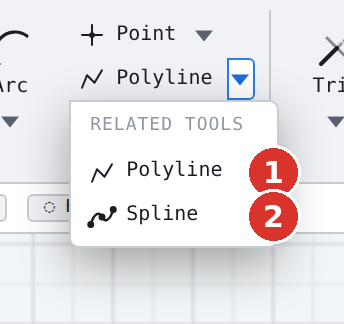
- Ribbon: group Draw, triangle on the Polyline button — entry Spline curve (2).
- Classic toolbar: drop-down triangle of the polyline family (5).
- Command search : Spline.
Procedure
- Click the first point (1).
- Place further points (2, 3, 4 …) — Place more points (Enter/double-click=end, C=close). From the second point on, the status bar counts along: Spline: n points (Enter/double-click=end, C=close).
- End with Enter or a double-click — or close it with C, which continues the curve between the last and the first point.

At the end the status bar reports Spline created: n points. Two points are the minimum.
What applies afterwards
- The spline is one element: selecting, moving, deleting and hatching act on the whole curve.
- The curve runs through the support points, not merely near them — the points are true pass-through points.
- If the curve starts at an existing endpoint, auto welding connects it there.
- On DXF export the curve is broken into fine straight segments.
Options
- The curve is created on the active layer with its colour and width.
- Object snap applies to every support point; K opens coordinate entry.
- The whole curve is one step for Undo.
Related commands
- Polyline — the same run with straight segments
- Arcs · Arcs tangent
- Offset — parallel to the spline as a polyline or a smooth spline