
Create and arrange groups
Goal
A bearing plate with the groups “Rahmen” and “Bohrbild”; the large hole should lie as subgroup “Zentrum” inside “Bohrbild”.
Steps
- Select the contour lines, right-click → “⊞ Group elements” (1), name “Rahmen”, Enter.
- Likewise group the small holes with their axes as “Bohrbild” and the large hole as “Zentrum”. All three groups are on the top level.
- In the “Groups” section grab the row “Zentrum” by its name and drag it onto the middle of the row “Bohrbild” (frame around the row) — release. “Zentrum” is now indented, “Bohrbild” has a fold triangle.
- Change the order: grab a row by the name and drag it to the upper edge of another row until the blue line appears.
- Click the eye of “Bohrbild”: holes and “Zentrum” disappear (inheritance). The lock of “Bohrbild” locks “Zentrum” too; afterwards “Zentrum” can be unlocked individually.


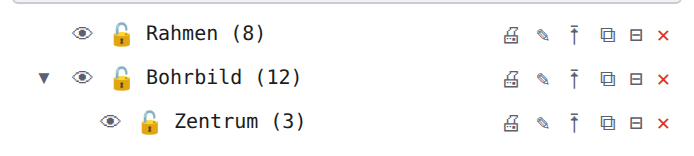
Result
A click on “Bohrbild” selects all holes including Zentrum; the “Properties” panel shows the path “⊞ Bohrbild › Zentrum” for a selected hole.
Tip
Instead of dragging: ⭱ “Move into group …” in the row opens a picker with search and “Top level”.