
Navigating the drawing
Zooming and panning only change the view of the drawing, never the drawing itself. All ways are available at any time — also in the middle of a drawing command.
With the mouse
| Action | Effect |
|---|---|
| Mouse wheel | Zoom about the pointer position; the point under the pointer stays in place. Each notch enlarges or reduces by the factor 1.1. |
| Middle mouse button drag | Pan the view. |
| Alt + left mouse button drag | Pan the view — for mice without a middle button and for trackpads. |
| Right-click | Context menu; in the zoom window and in post-selection it ends the operation. |
The current zoom factor is shown at the right of the status bar (🔍 4.38×).
Zoom window
With Zoom window (W) you frame the area that is to fill the window — press a corner and drag, or two clicks. The command stays active until you end it with Esc, the right mouse button or another click on the button. Command: Zoom window.

Show all and zoom out
Zoom to fit (A) places the whole drawing with some margin into the window; with isolation active only the visible part counts (Zoom to fit). H zooms out by one step (factor 1.5) without changing the centre of the picture (Zoom out) — this command exists only as a key and in the command search.
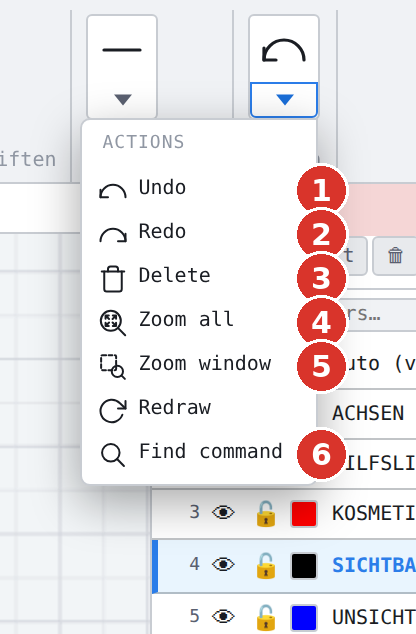
In a window 1400 pixels wide the group Action is collapsed and opens via its triangle; on wider screens the buttons lie open side by side.
Redraw
F5 (Redraw) cancels all running functions and rebuilds the display — the reset when a function hangs or the display no longer matches the content (Redraw).
Grid as orientation
The grid in the background grows when zooming out and becomes finer when zooming in (dynamic grid); the currently valid step is shown in the window Grid…. Visibility, fixed size and contrast: Set up the grid.
View when opening
When opening a drawing LiberoDraft restores the saved view; if it lies outside the drawing, the view is fitted automatically and the status bar reports View fitted automatically on load. After New drawing the view shows the origin centred.